Jmol
 | |
 Jmol three-dimensional structure rendering of streptavidin | |
| Developer(s) | Jmol development team |
|---|---|
| Initial release | 2001 (2001) |
| Stable release | 14.6.4 (October 15, 2016 (2016-10-15)) [±] |
| Preview release | 14.5.0 (7 November 2015 (2015-11-07)) [±] |
| Repository | sourceforge.net/projects/jmol |
| Written in | Java |
| Operating system | Cross-platform |
| Platform | Systems with Java and Web browsers without Java |
| Available in | 16 languages |
List of languages Catalan, Chinese, Czech, Danish, Dutch, English, French, German, Hungarian, Indonesian, Italian, Korean, Portuguese, Spanish, Turkish, Ukrainian[1] | |
| Type | Molecular modelling |
| License | LGPL 2.0 |
| Website | www.jmol.org |
Jmol is computer software for molecular modelling chemical structures in 3-dimensions.[2] Jmol returns a 3D representation of a molecule that may be used as a teaching tool,[3] or for research e.g., in chemistry and biochemistry.
It is written in the programming language Java, so it can run on the operating systems Windows, macOS, Linux, and Unix, if Java is installed. It is free and open-source software released under a GNU Lesser General Public License (LGPL) version 2.0. A standalone application and a software development kit (SDK) exist that can be integrated into other Java applications, such as Bioclipse and Taverna.
A popular feature is an applet that can be integrated into web pages to display molecules in a variety of ways.
For example, molecules can be displayed as ball-and-stick models, space-filling models, ribbon diagrams, etc.[4]
Jmol supports a wide range of chemical file formats, including Protein Data Bank (pdb), Crystallographic Information File (cif), MDL Molfile (mol), and Chemical Markup Language (CML). There is also a JavaScript-only (HTML5) version, JSmol, that can be used on computers with no Java.[5]
The Jmol applet, among other abilities, offers an alternative to the Chime plug-in,[3] which is no longer under active development. While Jmol has many features that Chime lacks, it does not claim to reproduce all Chime functions, most notably, the Sculpt mode. Chime requires plug-in installation and Internet Explorer 6.0 or Firefox 2.0 on Microsoft Windows, or Netscape Communicator 4.8 on Mac OS 9. Jmol requires Java installation and operates on a wide variety of platforms. For example, Jmol is fully functional in Mozilla Firefox, Internet Explorer, Opera, Google Chrome, and Safari.
Screenshots

Crystal structure of an H/ACA box RNP from Pyrococcus furiosus.
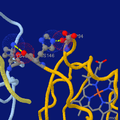
Highlighting two salt bridges in hemoglobin tetramer (hemo group as sticks at bottom-right).

A fragment of transcription factor TFIIIA forming three consecutive zinc finger motifs, bound to a stretch of DNA.

Eubacterial 70S Ribosome from Thermus thermophilus.


See also

Chemistry Development Kit (CDK)- Comparison of software for molecular mechanics modeling
- Jmol extension for MediaWiki
- List of molecular graphics systems
- Molecular graphics
- Molecule editor
- Proteopedia
- PyMOL
- SAMSON
References
^ Jmol translations
^ Chen, Jim X. (2008), Springer, ed., Guide to Graphics Software Tools, p. 471, ISBN 978-1-84800-900-4.mw-parser-output cite.citation{font-style:inherit}.mw-parser-output q{quotes:"""""""'""'"}.mw-parser-output code.cs1-code{color:inherit;background:inherit;border:inherit;padding:inherit}.mw-parser-output .cs1-lock-free a{background:url("//upload.wikimedia.org/wikipedia/commons/thumb/6/65/Lock-green.svg/9px-Lock-green.svg.png")no-repeat;background-position:right .1em center}.mw-parser-output .cs1-lock-limited a,.mw-parser-output .cs1-lock-registration a{background:url("//upload.wikimedia.org/wikipedia/commons/thumb/d/d6/Lock-gray-alt-2.svg/9px-Lock-gray-alt-2.svg.png")no-repeat;background-position:right .1em center}.mw-parser-output .cs1-lock-subscription a{background:url("//upload.wikimedia.org/wikipedia/commons/thumb/a/aa/Lock-red-alt-2.svg/9px-Lock-red-alt-2.svg.png")no-repeat;background-position:right .1em center}.mw-parser-output .cs1-subscription,.mw-parser-output .cs1-registration{color:#555}.mw-parser-output .cs1-subscription span,.mw-parser-output .cs1-registration span{border-bottom:1px dotted;cursor:help}.mw-parser-output .cs1-hidden-error{display:none;font-size:100%}.mw-parser-output .cs1-visible-error{font-size:100%}.mw-parser-output .cs1-subscription,.mw-parser-output .cs1-registration,.mw-parser-output .cs1-format{font-size:95%}.mw-parser-output .cs1-kern-left,.mw-parser-output .cs1-kern-wl-left{padding-left:0.2em}.mw-parser-output .cs1-kern-right,.mw-parser-output .cs1-kern-wl-right{padding-right:0.2em}
^ ab Herráez, A (2006), "Biomolecules in the Computer: Jmol to the Rescue", Biochemistry and Molecular Biology Education, 34 (4): 7, doi:10.1002/bmb.2006.494034042644
^ Herráez, A (2007), Lulu, ed., How to Use Jmol to Study and Present Molecular Structures, Volume 1, p. 21, ISBN 978-1-84799-259-8
^ "JSmol". Retrieved 2015-11-02.
External links
 | Wikimedia Commons has media related to Jmol. |
Official website
Wiki with listings of websites, wikis, and moodles
Willighagen, Egon; Howard, Miguel (June 2007). "Fast and Scriptable Molecular Graphics in Web Browsers without Java3D". doi:10.1038/npre.2007.50.1.


